
Guide to permanently disabling Windows Defender on a Windows VPS using Group Policy Editor to improve MetaTrader performance.
Windows Defender is Windows' built-in antivirus, useful for general protection. However, on a VPS dedicated to forex trading with MetaTrader, it is often unnecessary and consumes CPU and RAM resources.
Note: This tutorial applies to LTSC and Full versions of Windows. For the Lite version, this step is not needed — Windows Defender is already disabled by default.
Steps
1. Open Group Policy Editor
- Log in to your VPS via Remote Desktop — perform this tutorial inside the VPS
- Open Run (
Win + R) - Type
gpedit.mscand press Enter
2. Navigate to the Antivirus Policy
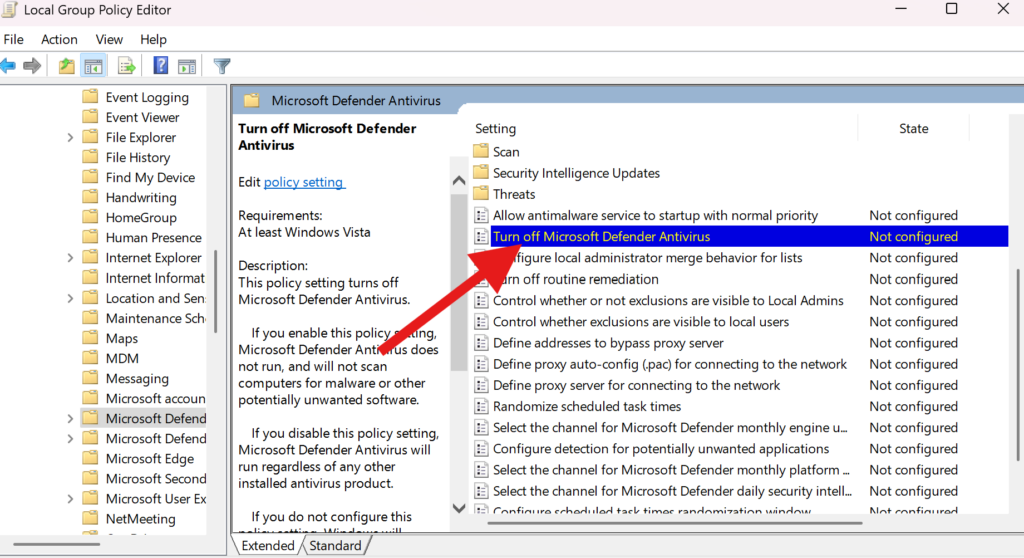
In the left panel, navigate to:
Computer Configuration > Administrative Templates > Windows Components > Microsoft Defender Antivirus
3. Disable Microsoft Defender Antivirus
- In the right panel, double-click Turn off Microsoft Defender Antivirus
- Select Enabled (this enables the policy that turns off Defender)
- Click Apply → OK
4. Restart the VPS
Restart the VPS to apply the changes.
Benefits for Forex VPS
- Better performance — reduced CPU and RAM usage, MetaTrader runs more smoothly
- Ideal for entry-level VPS — especially beneficial for VPS plans with limited specifications
Important: Ensure your VPS is only used for safe trading activities. Avoid downloading files from unknown sources. If you need additional protection, consider a lightweight alternative security solution.