
How to resolve the "MQL5 Community Authorization failed" error in MetaTrader 4/5 by editing the Windows hosts file.
VPS Forex users running MetaTrader 4 (MT4) may encounter the error "MQL5 Community Authorization failed". Here's how to fix it.
This guide has been tested on Windows Server 2012.
Step 1 — Open the Hosts File Directory
Navigate to the following path in Windows Explorer or via Run (Win + R):
C:\Windows\System32\drivers\etc
Locate the file named hosts in that folder.
Step 2 — Open the Hosts File with Notepad (as Admin)
Right-click the hosts file → Open with → Notepad.
Make sure to open Notepad as Administrator so you can save changes.
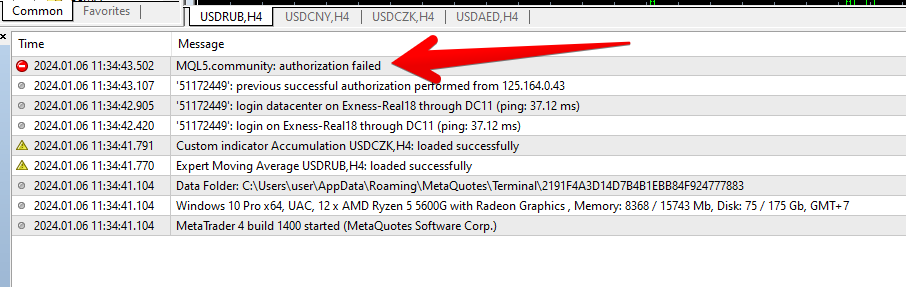
Step 3 — Create a Backup
Before making any changes, copy the hosts file to a safe location as a backup.
Step 4 — Remove MQL4/MQL5 Entries
In the hosts file, find all lines containing "mql4" or "mql5" and delete those lines.
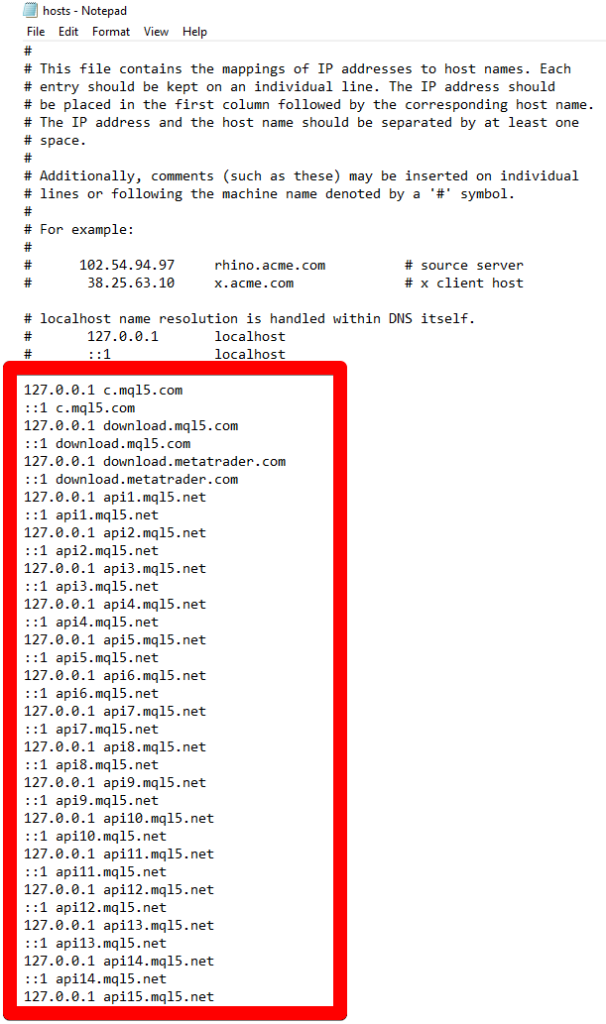
Step 5 — Save and Restart MetaTrader
Save the hosts file, then close and reopen MetaTrader 4/5.
Step 6 — Log In to MQL5
After MetaTrader restarts, try logging in to your MQL5 account again. If all steps were completed correctly, the authorization error should no longer appear.