
An explanation of how CPU works on digiOS VPS using the LXC Container system, how it differs from a Windows VM, and why CPU appearing active from the start is completely normal.
digiOS VPS uses an LXC Container system, not a classic VM like Windows VPS. Because of this, how CPU usage appears and is read is slightly different, but it is more efficient and honest about actual usage.
How CPU Works on digiOS VPS (LXC Container)
In a container system, the CPU may already appear in use (e.g. 10–20%) even when the VPS has just been opened. This is normal and not a problem.
The reasons:
- Basic container services start immediately
- The monitoring system runs from the start
- CPU readings are more real-time
⚠️ Don't focus on the total CPU number — what matters is:
- Applications run smoothly
- The server is responsive and stable
CPU Allocation Example
For a 1 Core package:
- The system displays 2 Cores
- Each core is capped at 50%
- The total is still equivalent to 1 full Core
How to read it:
- Starting CPU at 0% → maximum 50%
- Starting CPU at 50% → maximum 100%
This is the container resource sharing mechanism on digiOS.
Why LXC Container is More Efficient
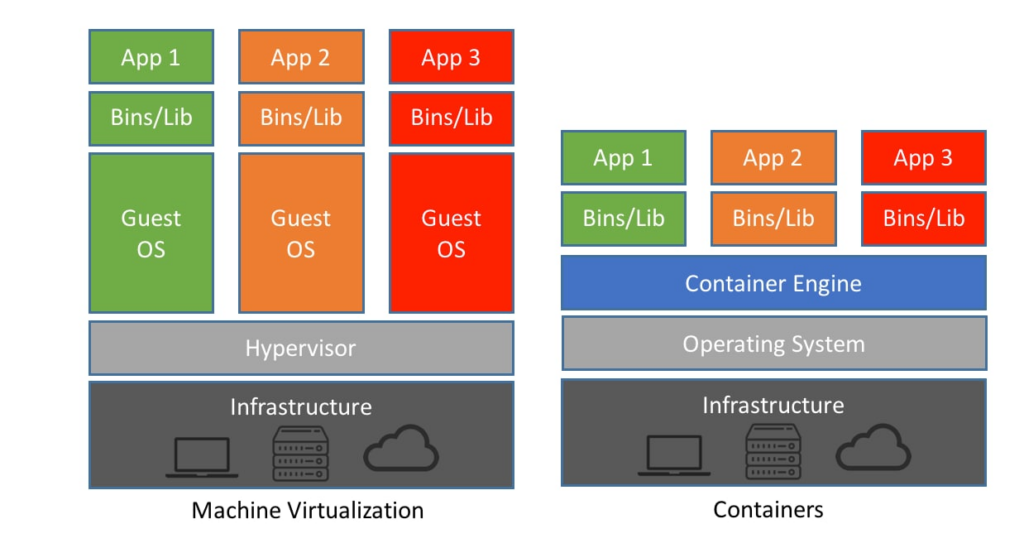
- No additional OS
- No virtual hardware
- CPU is used directly from the host
- More resource-efficient and stable Because of this, even though the CPU appears active from the start, application performance is actually more optimal.
How CPU Works on a VM (Windows VPS)
On a classic VM, even when Task Manager shows CPU at 0–5%, it doesn't mean the CPU is truly idle.
What's actually happening:
- The physical CPU is already divided at the hypervisor level
- This division is not shown inside the VM
- The VM only sees its virtual allocation, not the host CPU state
Additionally, a Windows VM has hidden overhead:
- Virtual CPU & virtual hardware
- Additional scheduler
- Built-in Windows services
As a result:
- CPU appears idle
- But when an application needs CPU, response can be slow
- Because the physical CPU is already being used by other VMs
Key Differences
| LXC Container | Windows VM |
|---|---|
| CPU appears active from the start | CPU appears idle |
| More transparent usage | More hidden overhead |
| Lighter | Heavier |
| Consistent performance | Performance can fluctuate |
Conclusion
- CPU appearing active on digiOS VPS is normal
- Focus on application performance, not the CPU number
- LXC Container is more efficient, transparent, and stable
- Windows VM often appears light, but is actually already divided behind the scenes
That's why digiOS VPS uses LXC Container for more optimal performance.