
Guide to monitoring your Forex VPS and website uptime for free using UptimeRobot — supports up to 50 monitors with alerts via Email, Telegram, Discord, and Webhook.
Monitoring the uptime of your VPS or website is essential so you're immediately notified of any downtime. We recommend UptimeRobot — a free monitoring service that lets you monitor up to 50 websites or servers at no cost.
Monitor VPS RDP / Forex with UptimeRobot
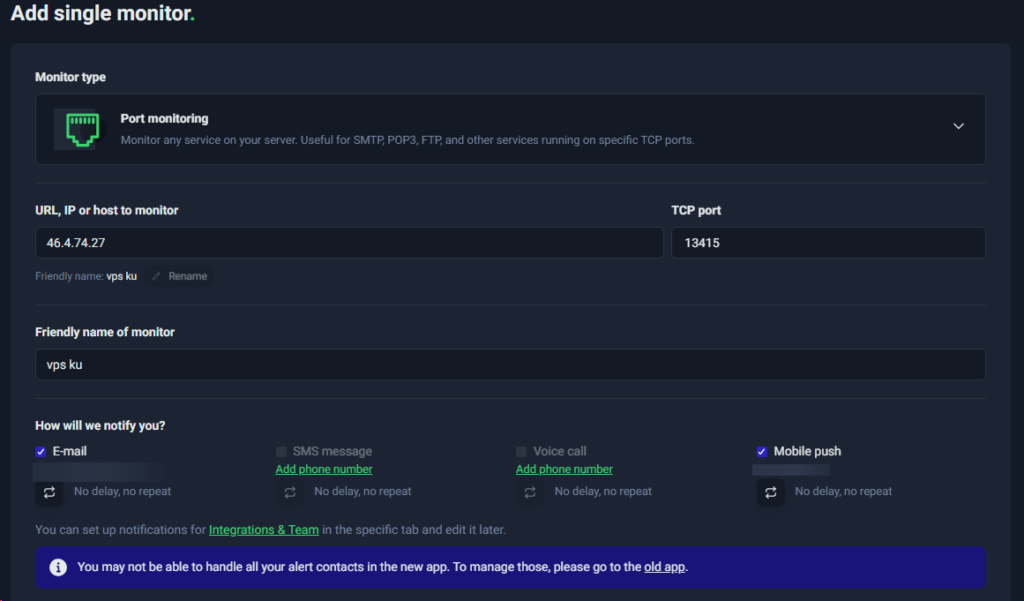
Steps:
- Visit UptimeRobot.com and log in (or register if you don't have an account)
- Click "Add New Monitor"
- Fill in the following settings:
- Monitor Type: Select
Port - Friendly Name: Your VPS name (e.g.,
Forex VPS) - IP (or Hostname): Your VPS IP address without a port (e.g.,
46.4.74.27) - Port Number: Your VPS RDP port (e.g.,
13415) - Monitoring Interval: Every 5 minutes (default)
- Alert Contact: Select your notification contact
- Monitor Type: Select
- Click "Create Monitor"
Monitor a Website (HTTP) with UptimeRobot
Steps:
- Open UptimeRobot and click "Add New Monitor"
- Fill in the following settings:
- Monitor Type: Select
HTTP(s) - Friendly Name: Your website name
- URL: Your website address (e.g.,
https://www.digitalku.com) - Monitoring Interval: Every 5 minutes (default)
- Alert Contact: Select your notification contact
- Monitor Type: Select
- Click "Create Monitor"
Notification Methods
UptimeRobot supports multiple notification channels:
- Telegram
- Discord
- Mobile App (iOS & Android)
- Webhook
To configure notifications, go to My Settings → Alert Contacts and add your preferred contacts.