
Digitalku accepts Bitcoin payments. Once your transfer is detected, the invoice is automatically marked as paid.
Digitalku accepts Bitcoin as a payment method — a digital currency that enables transactions without a bank intermediary, with relatively low transaction fees.
Payment Steps
Step 1: Open the invoice page you want to pay.
Step 2: In the payment method section, change the selection to Bitcoin.
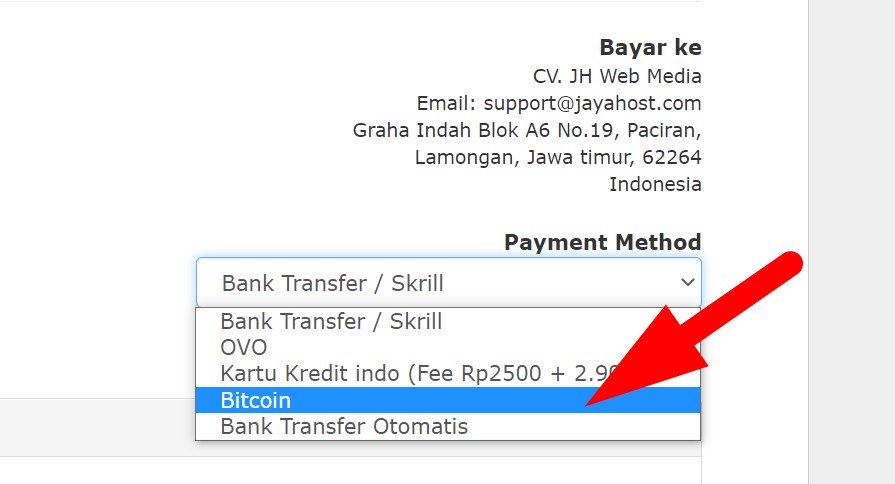
Step 3: Click Pay Now to proceed to the payment page.

Step 4: The system displays the exact Bitcoin amount to transfer and the destination wallet address. Complete the transfer precisely as shown.
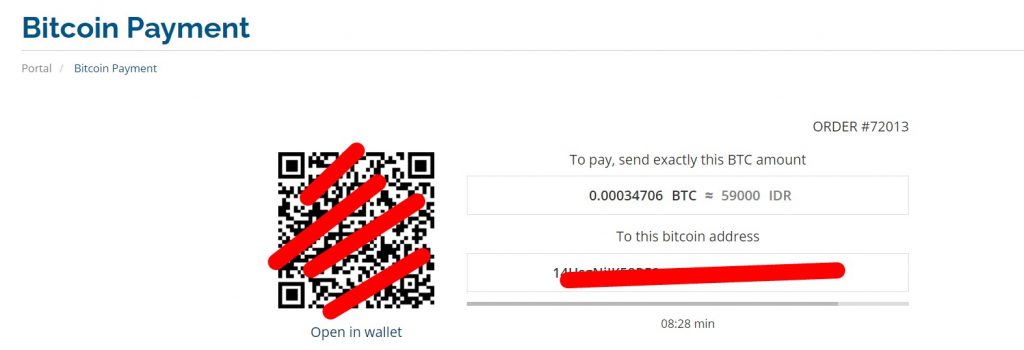
Step 5: Once your transfer is detected, the invoice will automatically be marked as PAID and your service will be processed immediately.