Here's a tutorial for monitoring websites and VPS remote desktops using UptimeRobot. Its function is to notify you via email if downtime occurs.
The advantage of Uptimerobot is that we can register online. FREE up to 50 websites
Monitoring VPS RDP / Forex with UptimeRobot
- Visit UptimeRobot.com and log in to your account.
- If you don't have an account, please register first.
- Add New Monitor
- Click the button “Add New Monitor”.
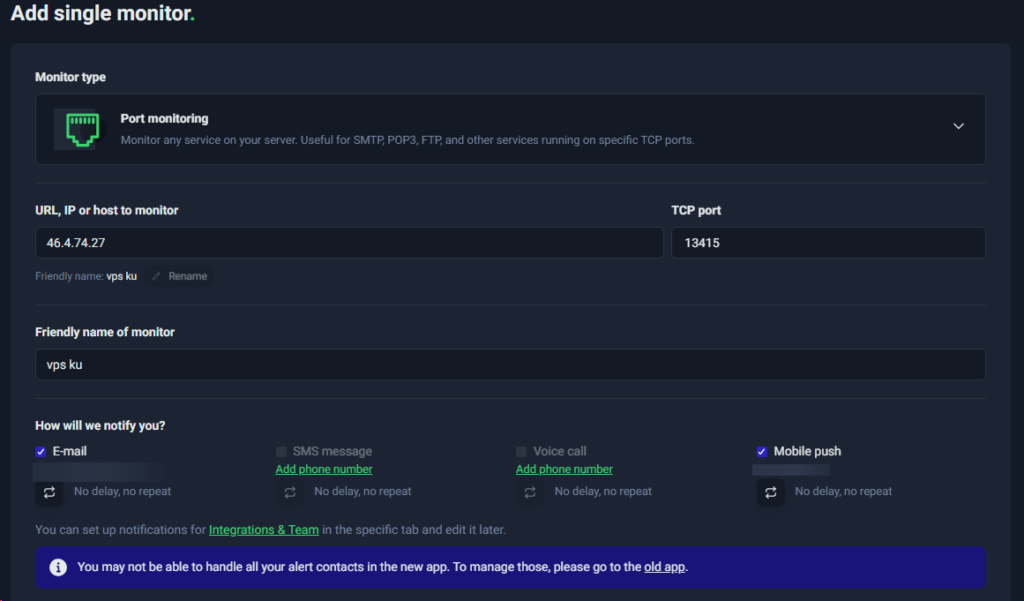
- In the section Monitor Type, choose Port.
- On Friendly Name, enter your VPS server name (example: “VPS Trading”).
- On IP (or Hostname), enter your VPS IP address without port (example:
46.4.74.27). - On Port Number, enter the RDP port used (example:
13415). - Set the monitoring interval as needed (default: 5 minutes).
- Choose notification contact to get notification if VPS cannot be accessed.
- Save Settings
- Click Create Monitor, and the system will start monitoring connections to your VPS.
Website Monitoring (HTTP) with UptimeRobot
- Open UptimeRobot
- Add New Monitor
- Click the button “Add New Monitor”.
- In the section Monitor Type, choose HTTP(s).
- On Friendly Name, enter your website name.
- On URL (or IP Address), enter the website address (example:
https://www.digitalku.com). - Set the monitoring interval as needed (default: 5 minutes).
- Choose notification contact to get notifications if the website is down.
- Save Settings
- Click Create Monitor, and your website will start being monitored by UptimeRobot.
Notification When Website or VPS Down
UptimeRobot can send notifications via various methods, such as:
- Telegram
- Discord
- Uptimerobot app (can be downloaded from the app store / play store)
- Webhook (if you want to connect to an API)
To set up notifications:
- Entered into My Settings > Alert Contacts
- Add contacts according to the desired notification method.
Now, you can ensure your website and VPS uptime is easily monitored using UptimeRobot!